Ahaya

Companies · teams · families · even just you

Just talk. The rest writes itself.

Your second brain for the AI era. What you said becomes profiles, to-dos and follow-ups — on its own.

Currently in limited release. Clients for Mac and iPhone.

Say a sentence Snap a photo Record a meeting Forward an email Drop a file Ask Siri Share a page Auto-pull from Drive Auto-pull from mail Record a video

The inversion: from process-then-data to facts-then-structure

The way it's always been done

Process data

The Ahaya way

Facts structure

Define the process first, then have people key things into it. Keying is a cost, nobody wants to do it, and everything stalls. Not just CRM — anything that asks you to build the structure before you have the content dies the same way. We reverse the causality.

Process first Ahaya
Where things come from Manual data entry A spoken sentence, a photo, a forwarded email, a Siri note
Where structure comes from Pre-defined fields and stages, maintained by hand Derived from raw records: people, tasks, dates, follow-ups
How things move forward Someone drags a card across a board Detected — a new record for someone you're waiting on is the signal
Why you'd trust it The diligence of whoever typed it in Immutable originals, citations, an audit trail you can roll back
Will it go stale Entry costs too much; abandoned in two weeks Capture costs almost nothing, so the memory layer keeps growing

How she works

One sentence in. Four things out.

What you just saidVoice · 0:42
“Confirmed with Mr Lee at Starlight — the documents go out before Friday. Also chase last month's invoice.”

What Ahaya derived

To-doSend the documents to Starlight before Friday — with a deadline, and it floats to the top when overdue.
Follow-upWaiting on Starlight's payment. The moment a new record lands for them, she flags it.
ProfileAdd “Mr Lee” to Starlight's contacts — she proposes; you decide whether it's written.
CalendarFriday's deadline lands on the calendar, and she speaks up before it's due.

Same at home: “Take the kid for a vaccination next Wednesday, and ask the doctor for a copy of the check-up.” The task, the reminder and the profile all grow the same way.

Already running

“Structure grows” isn't a vision. It's four things already shipping.

01

Follow-up signals

“Waiting on so-and-so” is proposed by her. When a new record arrives for that person, you get a nudge. The thing moved — nobody dragged a card.

02

Recurring calendar

Filing months, annual renewals, check-ups, contract dates — not a configured workflow, but a calendar computed from fields on a profile.

03

Profiles that grow

Field updates surface from evidence in new records; you only confirm. A profile is the sediment of your conversations, not a filled-in form.

04

Tasks that extract themselves

Action items are proposed via an ownership test — who is blocked? If they owe you the deliverable, you get “follow up with X”, not a chore.

Three layers

Organised around people: knowledge, time and business.

01 / the base

Knowledge

Capture anything: live voice transcription refined in the cloud, photos and video, drag-and-drop files, bulk import, automatic inflow from mailboxes and cloud drives. One multimodal pass extracts title, summary, when it happened, people, organisations, tags, action items and bilingual keywords.

Voice transcriptionMultimodal extractionHybrid search Knowledge graphCited answersMail & drive inflow
02

Time

You never create a to-do by hand — it's a by-product of what she extracted. A reminder when you arrive somewhere; a “leave now” nudge computed from live traffic; pre-meeting reminders; follow-up signals; mirroring into the system Reminders app; a home screen widget on iPhone.

Automatic to-dosGeofenced remindersTraffic-aware departure Pre-meeting nudgesApple Reminders mirrorHome screen widget
03 / where it goes deep

Business

The same base goes a long way for professional services firms: GST filing months and FYE parsed from client profiles into a compliance board with recurring reminders; cross-jurisdiction registration numbers (UEN, EIN, USCC) anchoring client identity; workload per staff member inferred from profile fields — and every number opens the list behind it.

Compliance boardCross-jurisdiction IDs Inferred workloadStatistics board

Traceability

Every answer has a citation. Every number has a list.

A number you can't click is a number people quietly distrust. So anywhere you make a decision, or anywhere she shows a conclusion, you can open the original on the spot.

Originals are append-only

Records can be added to, never rewritten. Supplements arrive as comments; the original words stay where they were.

Citations are exact substrings

When she answers a question, the quoted passage must match the source text exactly — not “roughly what it said”.

Every number has a list

Any statistic, any count badge, opens the underlying set of records.

She proposes, you confirm

Editing a profile, merging entities, creating a record — every write starts as a proposal, and destructive actions require explicit confirmation.

Changes are logged and reversible

Every edit keeps a version snapshot; sensitive changes enter the audit trail and can generally be rolled back.

Markdown is the source of truth

Records, entities and conversations are human-readable Markdown. Indexes and vectors are derivatives — your data stays portable.

A Mac on the desk,
an iPhone on the move.

The same Ahaya, catching you in different places.

Mac: reading and thinking

iPhone: catching things

One memory. Two ways in.

One backend, one dataset; both clients are built from the same Swift source, so they behave the same.

macOS

Primary surface
  • Today workbench: task centre, recurring board, profile suggestions
  • Situation board: what we're waiting on, what we owe, who's gone quiet
  • Media-first capture: Continuity Camera, row-by-row profiles from tables, OCR and document extraction
  • Records as timeline, calendar and map
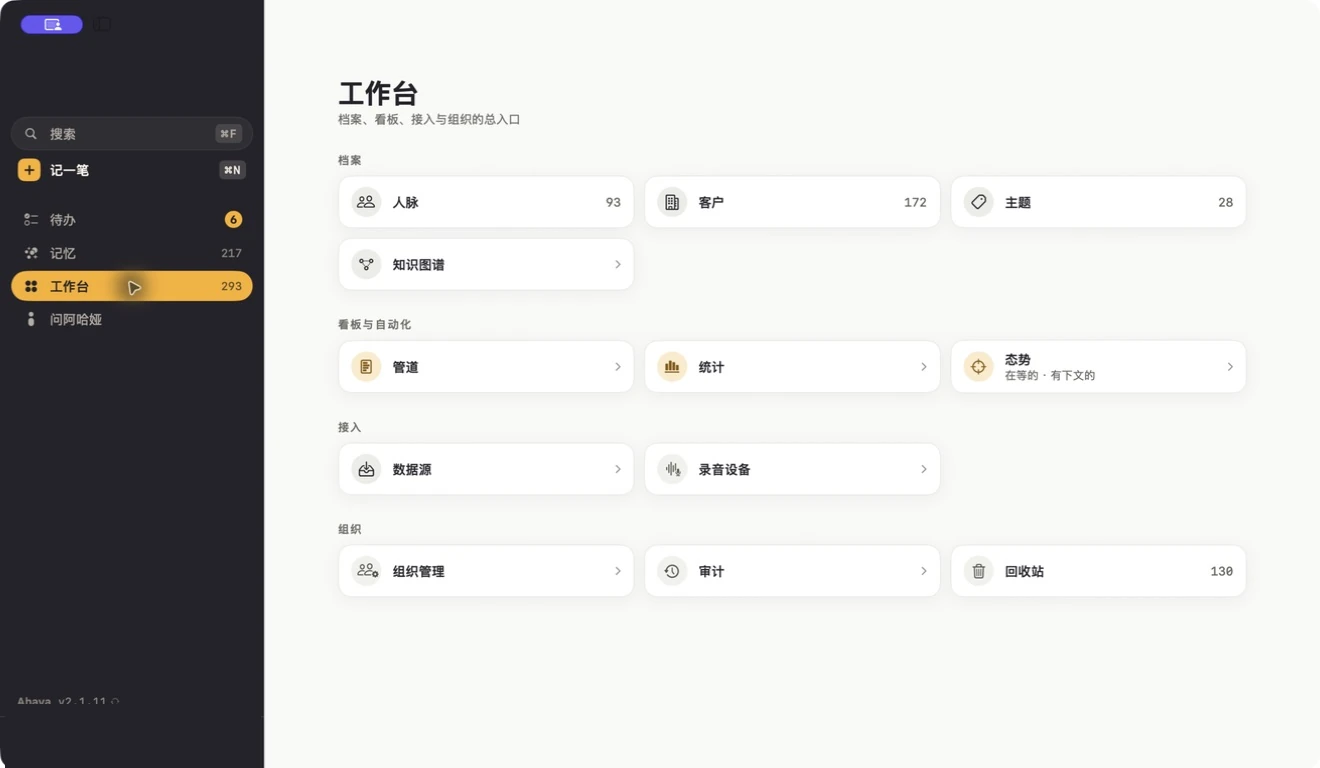
  • Entity command bar, knowledge graph, cited Q&A
  • In-app automatic updates

iPhone

Capture-first
  • One capture surface: record, photo, video, file — start to finish in one place
  • Offline queue and Live Activity, so the metro isn't a blocker
  • Share Extension: forward in from any app
  • Siri, Shortcuts and a home screen widget
  • Geofenced reminders and traffic-aware departure times
  • Face ID lock

Boundaries

What we don't build.

These three aren't “not yet”. They're deliberate — each one contradicts the inversion above.

No sales automation

No deal stages, quotes, contract flows or marketing automation. We aren't replacing your sales funnel — we're replacing the list in your head of who owes you what.

No configurable workflow engine

Any design that starts with “first configure the process” invites data-entry cost straight back in. Structure has to grow.

She doesn't make the call

She organises facts and proposes; the decision stays with you. That isn't modesty — it's how the write model is built.

Let Ahaya listen for a week, then see how much she kept.

We're in limited release. Email us what you'd like her to remember first — clients, projects, or everything going on at home. We'll arrange installation and import.